Credits are consumed whenever STQRY delivers your content but doesn't handle the payment. This guide explains when credits are used, how many you get, and what happens when you run out.
Understanding Credits on STQRY Marketplace
A credit is consumed when an access code is redeemed or an in-app purchase is made that is not subject to the commission. One credit = one content access.
Credits are not used when a listener pays through STQRY-powered platforms (e.g., the STQRY Guide app, web app, or STQRY's reseller accounts on Tripadvisor, Viator, Google Play, and Apple Store). Those sales are handled through the commission split.
When Is a Credit Used?
| Listener redeems an access code via your website | Yes — 1 credit |
| Listener accesses your tour via your OTA account using access codes (e.g., Tripadvisor, Viator) | Yes — 1 credit |
| You distribute content via in-person delivery | Yes — 1 credit |
| You sell through Google Play or Apple Store using your own developer account | Yes — 1 credit |
| Listener purchases through STQRY-powered platforms or STQRY's reseller accounts on Tripadvisor, Viator, Google Play, and Apple Store | No — commission split |
How Many Credits Do I Get?
Each plan includes a monthly credit allotment. Plan credits expire 12 months after distribution. You can purchase additional credits at any time — and purchased credits never expire.
| Credits included | Additional credit cost | |
| Free | 0 | $2.00 |
| Local & Specialty | 20/month | $1.00 |
| Standard | 100/month | $0.60 |
| Pro | 500/month | $0.30 |
*Prices displayed are in USD. Equivalent pricing in other currencies may differ based on your region
STQRY Apps customers don't need a Marketplace plan to use credits. Credits are included with your Apps subscription, and additional credits can be purchased at the rates above to lock or unlock content for members, events, or seasonal experiences.The minimum purchase is 25 credits. To buy additional credits, contact your CSM or email support@stqry.com.
For full plan details, see STQRY Marketplace Plans.
Credits for STQRY Apps Customers
STQRY Apps customers can purchase credits directly to lock or unlock content using access codes — ideal for short-term exhibitions, seasonal content, or restricting access to specific audiences.
Special Use Cases
- Members-only tours — Give museum or gallery members exclusive access to premium audio guides via access codes. Only members who receive a code can unlock the content, while general visitors see your free offerings.
- Event-gated content — Create a special tour or experience for a temporary exhibition or event, and distribute access codes only to ticket holders or registered attendees.
- Seasonal monetization — Unlock a holiday-themed tour, a seasonal walking route, or limited-time content for a specific period, then retire it when the season ends.
Seasonal Marketplace plans for Apps customers who want to monetize content periodically are coming soon. Contact your CSM or email support@stqry.com for details.
Examples
Access code distribution — You give a hotel 50 access codes for guests. Each redemption uses 1 credit. You keep 100% of any fee you charge the hotel.
In-app purchase (your own account) — A listener buys your tour through your own Google Play account. 1 credit is consumed. You keep the full purchase price (minus Google/Apple's fee).
Mixed — You sell a $10 tour on the STQRY web app and distribute 30 access codes to your Viator account. Web app sales go through the commission split (no credits). The 30 Viator access codes consume 30 credits.
Members-only (Apps customer) — Your museum is on a STQRY Apps plan. You purchase 200 credits and create access codes for your annual members to unlock an exclusive behind-the-scenes audio tour. Each code redemption uses 1 credit. Non-members can still enjoy your free public tours.
Frequently Asked Questions
What happens when I run out of credits?
Free content reverts to its fallback price until your plan renews or you purchase more. Paid content on STQRY-powered platforms is not affected.
Do credits roll over?
Included credits roll over for up to 12 months. Purchased credits never expire.
How do I track my credit usage?
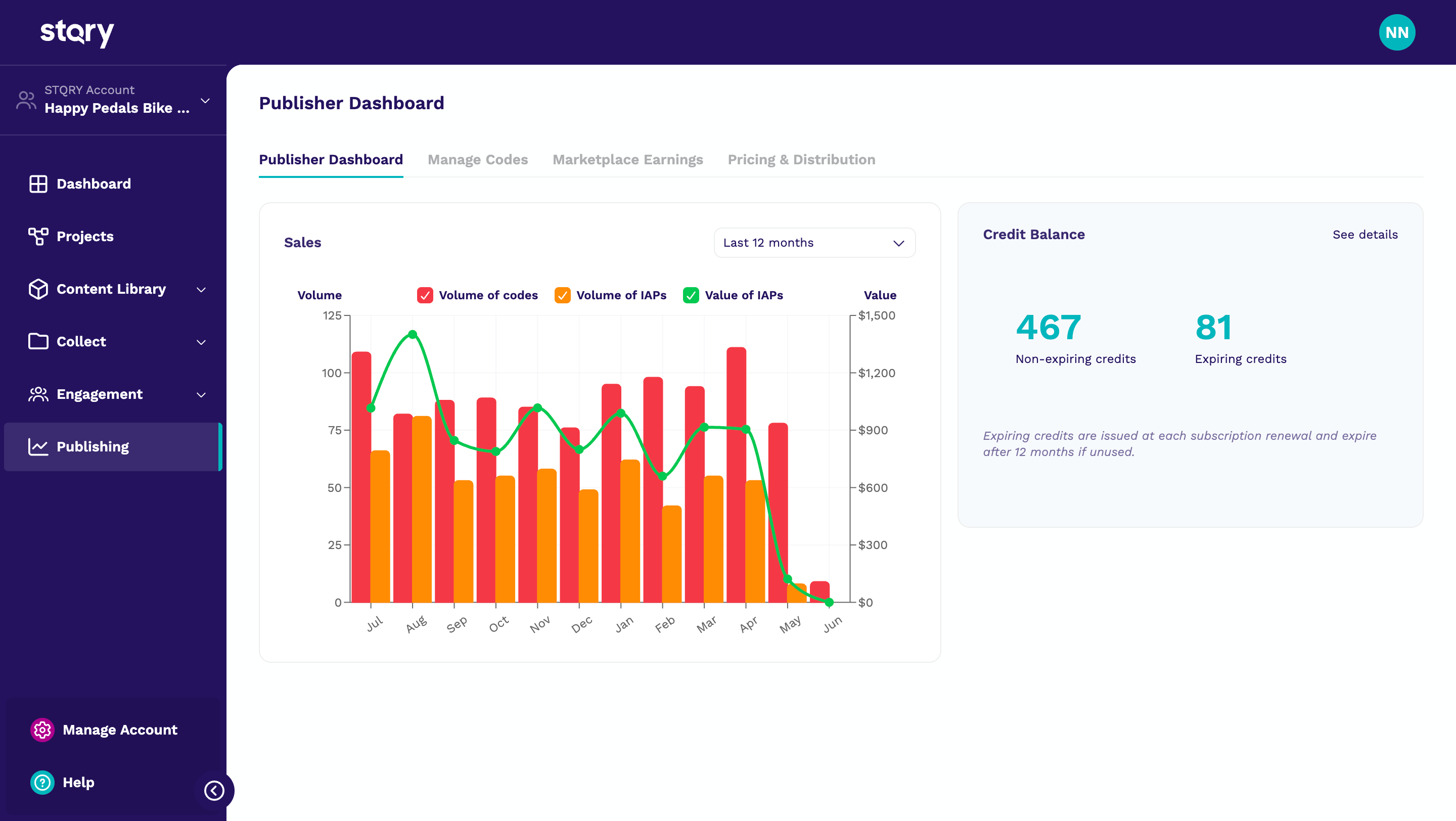
Your publishing dashboard shows your current balance, usage history, and expiration date.
Can I use credits if I'm on a STQRY Apps plan?
Yes. Apps customers can purchase credits without needing a Marketplace subscription. This is ideal for locking or hiding content for specific audiences, such as members, event attendees, or seasonal visitors.
Have questions about credits or need help choosing the right plan? Our team is here to help. Reach out to your CSM or contact us at support@stqry.com.
Was this article helpful?
That’s Great!
Thank you for your feedback
Sorry! We couldn't be helpful
Thank you for your feedback
Feedback sent
We appreciate your effort and will try to fix the article